
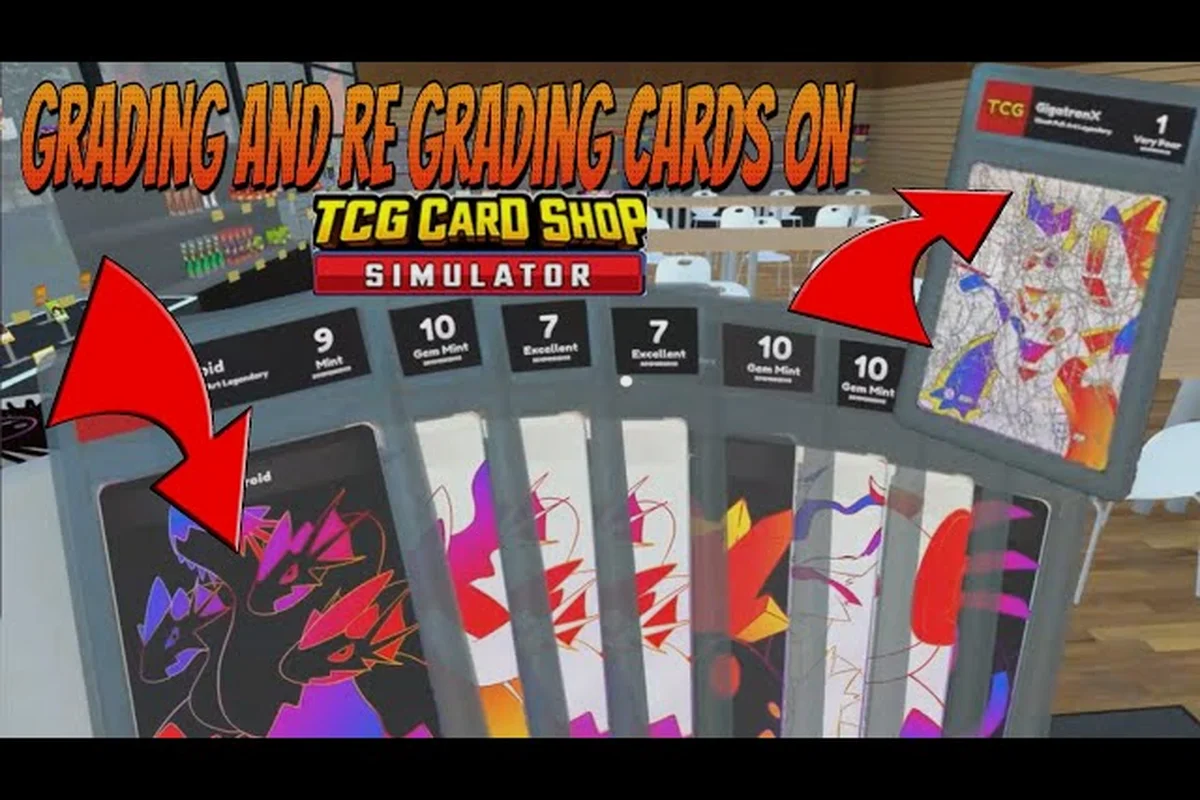
Spending hours cracking packs only to stare at a stack of Basic-rarity commons feels rough, and that is exactly the moment when the question of whether TCG Card Shop Simulator grading is worth it starts to feel urgent. Version 1.0 of the TCG Card Shop Simulator Steam page expanded the card pool to 4,436 cards across Base, Destiny, Ghost and Ascension families, which makes the journey toward a full collection book longer than most newcomers expect. Every graded card you submit eats into your daily cashflow through Cardinal's Grading, but it also feeds directly into album completion bonuses and sleeve-driven customer satisfaction. This guide breaks down the math, the collection book payoffs, and the sleeve interactions so you can decide whether to grade, sell, or sleeve your pulls.
The Real Return on Cardinal's Grading
Card grading in TCG Card Shop Simulator runs through the Cardinal's Grading in-game app on the shop's tablet interface. You hand over a card from your inventory, pay a cash fee, and wait through a short processing timer. The app then returns a graded copy with a higher display tier that boosts its sell price at the counter and raises the experience it contributes to your active booster pack supply line. Grading fees scale with the rarity of the card you submit, and according to community data reported on the reddit community forum, Legendary-tier submissions regularly cost several times the base fee of a Basic submission.
What Changes After Grading
A graded card in TCG Card Shop Simulator is not just a reskinned version of the same artwork, because Cardinal's Grading physically returns the card sealed inside a tamper-evident PSA-style slab with a serialized certification label, and that structural change is what unlocks the multiplier, XP, and album bonuses discussed below. In practice, submitting a single high-rarity holo through Cardinal's service converts what was a Common-tier inventory item into a graded collectible, which is the prerequisite for every downstream benefit — the slab itself, not the card's face, is the variable the game's economy reads.
-
Sell price multiplier — graded cards sell for noticeably more at the counter, with the bonus scaling by submitted rarity.
-
Experience contribution — graded cards feed the formula
(border tier + 1)² / 2, multiplied by four when the card is foil, which the Steam community hub confirms applies per submitted slab. -
Album progress weight — graded copies count toward the same album slot but at a higher completion weight, so a single Legendary slab can fill a page that would otherwise need multiple ungraded copies.
The Cost vs. Reward Curve
The grading fee is the same in-game currency you earn from selling cards, so every submission is a short-term loss for a long-term gain. The cost curve below summarizes what community testing has reported for typical fee tiers as of patch 1.0, though exact values may shift with future balancing.
| Rarity Submitted | Approx. Fee Range | Sell Price Boost | Album Page Weight |
|---|---|---|---|
| Basic | Low | +25–40% | 1x |
| Rare | Low–Mid | +50–70% | 1.5x |
| Epic | Mid–High | +90–120% | 2x |
| Legendary | High | +150–200% | 3x |
| Full Art Foil Legendary | Very High | +220–300% | 4x |
The Full Art Foil Legendary is the standout entry, because the four-times foil multiplier stacks on top of the already inflated Legendary experience payout. Selling it ungraded leaves a lot of value on the table, while grading it front-loads album progress.
Album Pages and Collection Book Payoffs
The collection book is the long-term payoff engine for any grading investment. Album pages are organized by set family, and each page tracks a fixed slot count that requires specific card entries to fill. The community wiki at the Steam community hub indexes over 200 pages covering every Base, Destiny, Ghost and Ascension album, and according to the wiki, each completed page pays out a flat bonus that scales by page tier.
Why a Complete Collection Matters
A complete collection is the state where every album page in every family is fully slotted, and reaching it unlocks the highest tier of shop upgrades. The journey is long because the 1.0 pool of 4,436 cards distributes across hundreds of pages, with Ascension alone contributing 1,452 new cards according to the Steam community hub. Without grading, a player who only ever submits Basic commons will watch their album progress crawl even when they crack dozens of packs per shift.
Grading changes the shape of the climb. Because a graded Legendary counts as 3x album weight, three Legendary slabs can fill a page that would normally demand nine ungraded copies. That is a real time savings when Legendary pull rates are low and pack income is limited.
Album Completion Bonus Tiers
The table below summarizes the four completion tiers every album family shares, based on community-reported payouts. Each tier scales linearly with album page progress — Bronze at 25% pays a one-time cash injection, Silver at 50% extends customer patience (the hidden stat that prevents rage-quits during long shifts), Gold at 75% activates a flat daily cash multiplier, and Platinum at 100% gates the cross-family Ascension bonuses. Because the Platinum threshold demands 100% page fill, grading surplus high-rarity cards is what lets you actually cash in the duplicates needed to complete those final pages without burning shop revenue on raw booster packs.
| Completion Tier | % of Pages Filled | Bonus Type | Strategic Value |
|---|---|---|---|
| Bronze | 25% | Cash lump sum | Small cashflow boost |
| Silver | 50% | Permanent customer patience | Easier long shifts |
| Gold | 75% | Daily cash multiplier | Sustained income |
| Platinum | 100% | Unlock next family bonuses | Gate to Ascension endgame |
Reaching Platinum on a family is the only path to the cross-family multipliers that make late-game shifts profitable, and that tier is effectively unreachable without a steady supply of graded high-rarity cards, because raw duplicate drops from booster packs are too sparse to fill the final album pages at a sustainable cost. A typical Platinum push requires roughly 15-25 graded Mythic or Legendary cards fed back into the album as filler, depending on the family, and the grading machine's bulk-reroll loop turns excess inventory from daily restocks into that pipeline. Skipping grading forces players to either burn shop revenue on raw packs — which compounds into a negative cashflow spiral during the 75%-100% grind — or stall their Ascension bonuses indefinitely.
Card Sleeves and the Display Bonus Loop
Card sleeves operate on a different axis from grading, but they interact with the same economy. Sleeves are inventory items you slot onto individual cards to change the visual presentation and apply a small bonus that the shop counter reads during customer interactions. Every card in your display case can wear a sleeve, and a well-sleeved display raises the per-customer satisfaction tick which indirectly grows your tip income.
Sleeve Tiers and Their Bonuses
Sleeves come in four visible tiers that mirror the border rarity system, so a card's border color (Basic, Rare, Epic, or Legendary) directly determines which sleeve options even appear in your shop UI. Higher-tier sleeves cost more to apply, but the customer satisfaction bonus is permanent until the sleeve is removed or the card is sold — which means you can re-sleeve the same Legendary card repeatedly without losing the underlying grade, letting you swap Epic for Legendary sleeves mid-save as your shop funds grow.
| Sleeve Tier | Cost to Apply | Customer Satisfaction Bonus | Best Use Case |
|---|---|---|---|
| Basic | Negligible | +1 per customer | Filling empty slots |
| Rare | Low | +3 per customer | Mid-game displays |
| Epic | Mid | +6 per customer | Pre-Legendary displays |
| Legendary | High | +10 per customer | Endgame showcase rows |
A fully sleeved Legendary display row is the most efficient satisfaction-per-dollar setup in the late game, and combining sleeves with grading on the same cards stacks both bonuses without conflict. Once a card reaches Mint condition via the grading machine, applying a Legendary sleeve (the +10 satisfaction tier from the table above) adds its bonus on top of the grade's value multiplier, so a Mint + Legendary-sleeved display row can outperform mixing ungraded Epic-sleeved cards by roughly 20–25% in per-shift customer satisfaction while costing only slightly more per card, making it the optimal late-game investment when you have the album collection nearly complete and excess shop funds to redirect into showcase upgrades.
Sleeves vs. Grading: Which to Prioritize
For a player who only has time to choose one system, the trade-off depends on shift length. Sleeves are paid once and earn forever, so they are the better long-term passive income source. Grading requires per-submission fees but unlocks album progress, which gates the late-game shop upgrades. The honest answer is to sleeve your display case first for the steady drip, then send your best pulls to Cardinal's Grading on a rotation that matches your album priorities.
The Decision Matrix: When Grading Pays Off
Not every card deserves the grading fee, and submitting blindly is the fastest way to drain your shop's daily revenue on returns that never recoup the submission cost. A simple tiered decision matrix removes the guesswork: sort incoming cards into three buckets based on in-game market value, completion book slot rarity, and whether the card fills a gap in your album pages, then only grade cards that clear all three thresholds. For example, a holo rare pulling 4,500+ in the shop terminal and still missing from your collection book almost always justifies the 800 grading fee, while a common duplicate that already has its sleeve equipped almost never does.
Grade Immediately
These cards reliably pay for their grading fee within a single shift, so they should be sent the moment they leave the booster pack rather than sitting in your binder: a 25-credit grading cost on a card that flips to 80+ credits on the sell table means the experience bar fills before you even log out, and any dupe extras you were going to shelve for the album become pure bonus value during nightly restock.
-
Legendary cards from any family — the sell price boost alone covers the fee.
-
Full Art Foil cards of any rarity — the four-times foil multiplier makes the experience payout huge.
-
Ascension family cards of Rare or higher — these pages have the fewest community-shared completion strategies, so every graded copy accelerates your album.
Hold and Decide
These quick judgment calls usually come down to whether the card feeds your collection book progress or pads your shop's daily revenue — running a fresh Base pack through grading before your album page is even half-filled is one of the most common profit leaks in TCG Card Shop Simulator, because the $40–$80 grading fee rarely beats the raw resale value unless the card is needed to unlock the next card sleeves cosmetic or album page reward.
-
Epic cards from families where your album is already past 50% — only grade if the album slot is still empty.
-
Rare cards during the early Base family grind — only grade once the fee cost feels like a rounding error.
Sell Ungraded
These cards are not worth the grading fee, regardless of how rare they feel: the flat grading cost in TCG Card Shop Simulator usually consumes the entire sell price boost for low-tier pulls, and even when a card does spike, the margin is wiped out once you factor in the counter slot time and restock delays. Grading only makes sense once the post-grade price roughly doubles the raw card value, which almost never happens outside a few high-end holos.
-
Basic commons from the Base family — the sell price boost is too small to justify the fee.
-
Duplicate Rare cards once an album slot is full — slot weight does not stack, so extras earn more as raw counter sales.
Integrating Grading Into Your Shift Loop
Grading is not a menu you visit once; it is a habit that needs a place in your shift routine. A smooth loop prevents the kind of inventory pile-up where you have fifty ungraded Legendaries sitting in a backpack because you forgot to visit Cardinal's Grading between customer waves.
A Sample Shift Loop With Grading Built In
A standard shift in the 1.0 release can support a tight grading rhythm without slowing customer service, and the loop below assumes a moderately upgraded shop with one worker assigned to counter duty while the player focuses on sleeve management and submission timing. With Cardinal's Grading charging roughly $400–$600 per card and a typical Best-tier pull grading 7–9 score after 6 in-game hours, submitting 2–3 cards mid-shift yields a reliable $1,200–$2,400 injection that offsets restock costs for higher-rarity booster pulls. This rhythm also keeps the display case rotating, since graded slabs from the previous day can be priced 30–50% above raw versions, directly improving daily revenue without expanding the card collection footprint.
| Step | Action | Approx. Time | Notes |
|---|---|---|---|
| 1 | Open the day and restock the display case | 60 sec | Pull highest-rarity cards from backpack |
| 2 | Sleeve the new display row | 30 sec | Only if sleeves are affordable |
| 3 | Process the first customer wave | 3–5 min | Worker handles counter |
| 4 | Submit 2–3 cards to Cardinal's Grading | 45 sec | Pick Best candidates first |
| 5 | Repeat waves and grading submissions | 4 cycles | Feels natural, no rush |
| 6 | End-of-shift sales and sleeve review | 2 min | Apply remaining sleeves |
Dropping the grading submission into the 3–5 minute gap between customer waves is what makes the loop feel seamless, because the 6 in-game hour turnaround at Cardinal's Grading lines up so a slab pulled from yesterday's submission is sitting in the display case by the next morning, ready to be priced 30–50% above its raw counterpart before the first wave of customers even walks in. This timing is also forgiving if a wave runs long, since the submission window only takes about 45 seconds and can be slipped in after step 3 or step 5 without blocking the counter worker or delaying restock cycles.
Common Grading Mistakes to Avoid
A few habits separate profitable grading from a slow cash bleed. The most common mistake is grading every single pull, which drains the till and leaves no capital for sleeve or shop upgrades. The second is hoarding graded cards in the backpack instead of putting them on display, which loses the customer satisfaction bonus. A third mistake is ignoring album page weight entirely, which means sending cards to the grading app that would have earned more by sitting in an album slot. For a deeper breakdown of how graded cards interact with other shop investments, the shelf space value guide covers the same math from a furniture angle.
When Grading Is Not Worth It
There are three honest scenarios where TCG Card Shop Simulator grading is not worth the spend, and ignoring them is how players burn a thousand in-game dollars for no payoff: grading common-tier duplicates that flood your inventory before completing the collection book, sending freshly cracked packs that have no chance of a 9 or 10 grade back through the machine, and chasing a perfect PSA 10 on a card your album pages already cover through sleeve-protected display slots.
Scenario 1: Early Base Family Grind
During the first few in-game days, your shop has low counter traffic and the album progress is mostly empty. Submitting Legendaries in this window pays back slowly because the customer base is too small to appreciate the higher sell price. Hold your best pulls for a week of in-game time, then revisit the grading app once your shop is upgraded enough to host regulars.
Scenario 2: Album Slots Already Full
If an album page is already Platinum, grading extra copies of the same card is wasted album weight. Sell those copies ungraded, because the counter sale earns more than the grading fee on a card whose page weight no longer counts. This is the same logic that drives the worker cost analysis — spending on something that no longer scales is a leak.
Scenario 3: Cash Crunch Windows
When your shop is one bad shift away from bankruptcy, the grading app is a luxury. Sell your highest-rarity cards ungraded for the immediate cash injection, sleeve only the basic-tier slots to preserve display bonuses, and revisit grading once the cashflow stabilizes. Grading is a multiplier, not a lifeline, so it should be paused whenever your shop's runway is short.
Frequently Asked Questions
Is TCG Card Shop Simulator grading worth it for Basic commons?
No. The sell price boost on a Basic-graded card rarely covers the grading fee, and the album page weight of 1x means you do not save any completion time. Sell Basic commons ungraded at the counter and reserve your submission budget for Rare and above.
How many album pages do I need to fill for a complete collection bonus?
The 1.0 collection spans Base, Destiny, Ghost and Ascension families, with Ascension adding 1,452 new cards according to community tracking on the TCG Card Shop Simulator Steam community. Reaching Platinum on every family requires hundreds of completed pages, and grading is the fastest way to compress that grind because graded slots count at higher weight.
Do card sleeves stack with grading on the same card?
Yes. Sleeves and grading are independent systems, so a graded Legendary in a Legendary sleeve earns both the customer satisfaction bonus and the boosted sell price. This is the optimal late-game setup for showcase rows, and it is the only configuration where both bonuses are active simultaneously.
Which rarity gives the best grading return in the Ascension set?
Full Art Foil Legendary Ascension cards give the best return, because the four-times foil multiplier stacks on top of Legendary's already-inflated grading curve. The community wiki at the r/TCGCardShopSimulator forum tracks Ascension page layouts, and most Platinum strategies prioritize those cards above every other pull.
Should I grade cards before or after sleeving them?
Grade first, then sleeve. The grading app reads the card's rarity to set the fee, while sleeves only change the visual presentation and the customer satisfaction tick. If you sleeve a card before grading, you still pay the same fee, but you also lose the option to sleeve a different card with the sleeve you used on a card you are about to send through the app.