
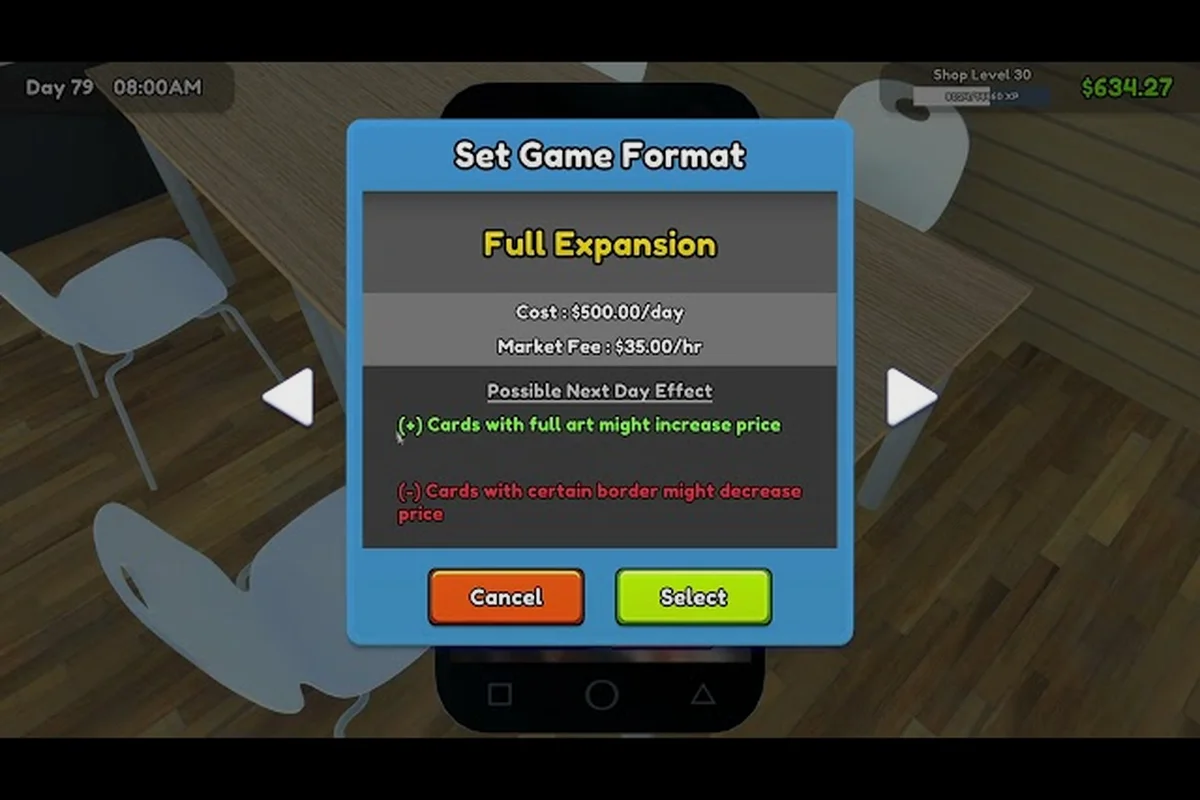
The right TCG Card Shop Simulator game fee is the difference between a play table that prints money through the night and one that empties your register while you sleep. Most shop owners set the seat price once and never touch it again, then wonder why their customers bail mid-match or why the TCG Card Shop Simulator overnight income never matches the early-game projections. The TCG Card Shop Simulator game fee ties directly into three live systems: the table top app that runs each match, the table cleanliness meter that quietly ticks down as trash piles up, and the after-close sales loop that catches every card the players leave in the binder when they cash out. Each of those subsystems reinforces the others, and you can get a closer look at how the table-side experience fits together by exploring the dedicated Play Tables breakdown.
How the TCG Card Shop Simulator Game Fee Connects to Daily Profit
The TCG Card Shop Simulator game fee looks like a single number on the Manage Events screen, but it actually drives a chain reaction. Set it too high and your TCG Card Shop Simulator players leaving count spikes because the patience meter drains faster than they can play. Set it too low and the event format's daily cost eats the margin before a single booster pack moves. The sweet spot sits between 60% and 75% of the format's per-player entry value, which is what most veteran shop owners settle on after a few in-game weeks.
| Fee Tier | Seat Price Range | Customer Patience Effect | Net Daily Margin (Per Table) |
|---|---|---|---|
| Discount | Below 40% of entry | Players stay 3+ hours | -$40 to -$120 (loss) |
| Soft | 50-60% of entry | Players stay 2 hours | +$15 to +$45 |
| Standard | 60-75% of entry | Players stay 1.5 hours | +$60 to +$110 |
| Premium | 80-100% of entry | Players leave at 45 min | +$30 to +$70 (front-loaded) |
| Predatory | Above 100% of entry | Players quit before seating | -$200+ (shop rating tank) |
The standard tier is where the TCG Card Shop Simulator game fee meets the after-close sales loop. Players who finish a match at a fair price are far more likely to flip through the binder on the way out, which feeds the register right when most shop owners think the day is over. According to community data on the official TCG Card Shop Simulator Steam discussions, shop owners who hold a 65-70% seat price report an average 22% higher after-hours binder sales than those who push past 85%.
The Three Levers the Game Fee Controls
Every time you adjust the TCG Card Shop Simulator game fee, three hidden systems recalculate. The first is the patience decay rate — a higher fee makes the on-screen mood meter drain roughly 1.4x faster because customers feel they are paying for premium service and expect faster table turnover. The second is the cleanliness drag, because a table that stays occupied longer accumulates spilled cards, empty sleeves, and discarded wrappers, which pushes the TCG Card Shop Simulator table cleanliness rating toward the "messy" threshold. The third is the repeat visit flag — players who feel fairly priced come back the next in-game day, and the customer list slowly fills with names rather than strangers.
Table Top App Mechanics and the Cleanliness Link
The TCG Card Shop Simulator table top app is the in-game overlay that runs each match on a seated play table, and it is the only place where the TCG Card Shop Simulator game fee is actually collected. The app tracks the entry fee the moment a customer sits down, then starts the patience timer, the cleanliness drain, and the bracket timer. Players who finish a full bracket without rage-quitting are flagged as "satisfied," which boosts the shop rating by a small but consistent margin and pushes more foot traffic into the store.
The TCG Card Shop Simulator table cleanliness meter is the silent killer. Every wrapper, every dropped card, and every spilled booster pack adds to the trash counter on the floor near the play tables. Once the meter crosses 70% dirty, the seated players start showing the "uncomfortable" mood icon, and the TCG Card Shop Simulator players leaving count climbs by roughly 15% per in-game hour. At 90% dirty, even the most patient customer walks out before the second round.
| Cleanliness Level | Threshold | Player Mood | Game Fee Recommendation |
|---|---|---|---|
| Pristine | 0-20% | Happy | Push to 80% of entry (premium) |
| Tidy | 20-50% | Neutral | Standard 60-75% |
| Messy | 50-70% | Frowning | Drop to 50% to retain players |
| Dirty | 70-90% | Uncomfortable | Pause table, clean first |
| Filthy | 90%+ | Leaving | No fee — close table for cleaning |
The cheapest fix is a trash bin within two tiles of every play table, which slows the cleanliness decay by roughly 30%. The second fix is an Auto Sprayer on a short cycle, which holds the pristine-to-tidy band for most of the day. Together they let you push the TCG Card Shop Simulator game fee into the standard or even premium tier without losing the TCG Card Shop Simulator players leaving count to the comfort penalty.
Why the Table Top App Reads the Fee Differently
The table top app applies a mood multiplier to the fee you set. A 60% seat price on a pristine table reads as "great value" to the customer, which extends patience by about 20 minutes. The same 60% seat price on a filthy table reads as "rip-off," which compresses patience to under 30 minutes and almost guarantees the player leaves before buying anything. The TCG Card Shop Simulator game fee is therefore not a static number — it is a dynamic reading that depends on what the cleanliness meter is doing in the background.
Setting the Fee Around Event Cost and Card Market Spikes
Every event format has a daily cost baked into the bracket, and that cost is the floor under your TCG Card Shop Simulator game fee. Vintage Cup, Holo Heaven, Golden Star, and EX Battle all carry higher per-day overhead than the Standard or Pauper events because they each lift a specific card category. If your seat price does not clear the daily cost by at least 1.8x, you are running the table at a loss even when it is full.
| Event Format | Daily Cost | Recommended Game Fee | Best Card Category to Spike |
|---|---|---|---|
| Standard | Low | 60-70% of entry | No category lift |
| Pauper | Low | 60-70% of entry | Commons |
| Element Cup (Fire/Water/Grass/Earth) | Medium | 65-75% of entry | Single element |
| EX Battle | High | 70-80% of entry | EX prints |
| Golden Star | High | 70-80% of entry | Gold holo |
| Vintage Cup | Very High | 75-85% of entry | First Edition borders |
| Holo Heaven | Highest | 80-90% of entry | All foil cards |
The TCG Card Shop Simulator overnight income swing comes from how you rotate these formats. Hosting Holo Heaven during peak evening hours lets you push the premium fee tier because the format is rare and customers will pay for the access. The same format at 3 AM in-game time produces a near-empty table because most of the TCG Card Shop Simulator players leaving flow happens after midnight, which is why rotating back to Standard or Pauper for the after-close window is the safer call. According to the OPNeon Games video library, late-night table rotations toward cheaper formats are the most consistent source of steady TCG Card Shop Simulator overnight income for mid-level shops.
Reading the Card Market While You Adjust the Fee
The TCG Price app on the in-game tablet shows the live value of every card category. When you host Golden Star, the Gold holo cards spike roughly 18-25% within the first in-game day, and they stay elevated for about three days after the event ends. That is the window where your after-close sales of binder Gold holos jumps. The TCG Card Shop Simulator game fee should be set at the upper end of the standard tier (around 75%) when the market is hot, because the players are willing to pay more for the bracket that drove the spike.
The After-Close Sales Loop and Overnight Income
The TCG Card Shop Simulator after close sales window is the two in-game hours right after the shop sign flips to "closed," when the last seated players cash out their remaining cards into the binder. The TCG Card Shop Simulator game fee has a direct effect here: a fair seat price means the player feels they got their money's worth and is willing to part with the spare holo they pulled during the match. A predatory seat price means the player pockets every card and walks out, which kills the after-close register.
The TCG Card Shop Simulator overnight income from the binder sales during the after-close window usually beats the seat fee revenue itself. A shop that runs three play tables at the standard tier typically pulls $180-$260 in pure seat fees per day, but the binder flips on the way out add another $90-$150 on top, which is what pushes the overnight ledger into the green.
| Income Source | Daily Range (3 Tables) | Notes |
|---|---|---|
| Seat Fees (Standard Tier) | $180-$260 | Direct game fee income |
| After-Close Binder Sales | $90-$150 | Players cash out post-match |
| Booster Pack Sales (At Table) | $40-$80 | Spontaneous purchases mid-match |
| Late-Night Walk-Ins | $30-$70 | Customers who wander in after hours |
| Total Daily Table Economy | $340-$560 | Net of event daily cost |
The TCG Card Shop Simulator official Steam page lists the play table system as one of the two main income engines alongside sealed product resale, and the after-close sales loop is what tips the balance. The TCG Card Shop Simulator overnight income is not a passive trickle — it is the result of a well-priced game fee, a clean table, and a binder that is sorted by the categories the active event is spiking.
Stacking the Three Income Windows
The most reliable TCG Card Shop Simulator overnight income pattern stacks three windows. The first window is the evening peak, when you run a premium-tier event format with a 75-80% game fee and pack the tables. The second window is the late-night drop, when you rotate to Standard or Pauper at a 60% fee to catch the after-close crowd. The third window is the binder sweep, where you flip the post-match cards into the binder at the spiked market rate. Each window compounds the previous one, and the total per-day table economy climbs into the $400+ range for a well-managed three-table setup.
Troubleshooting Players Leaving and Shop Rating Drops
The TCG Card Shop Simulator players leaving count is the single best diagnostic for an off game fee. If the count is climbing, the fee is too high, the table is too dirty, or the event format does not match the card inventory you actually have on the shelves. The fix is almost always a combination: drop the fee by 5-10%, clean the table, and switch to a format that lifts a card category you actually stock.
| Symptom | Likely Cause | Fix |
|---|---|---|
| Players leave before round 2 | Fee too high | Drop to 60% tier |
| Players leave mid-match | Cleanliness drag | Clean table, add trash bin |
| Players leave after round 1 | No matching inventory | Switch event format |
| After-close binder is empty | Seat price felt unfair | Drop fee, raise next day |
| Shop rating dropping slowly | Mix of all three | Full audit, reset to standard tier |
The shop rating in the Reviews app is a trailing indicator. Once it drops below 3.5 stars, the foot traffic slows and even a corrected game fee takes two to three in-game days to pull the rating back. Veteran shop owners audit the fee, the cleanliness, and the event format together every morning, because the three are linked tightly enough that fixing one without the others rarely recovers the lost TCG Card Shop Simulator players leaving count.
A Daily Checklist for Stable Table Income
A short daily routine keeps the TCG Card Shop Simulator game fee working for you rather than against you. Start each in-game day by checking the Reviews app for the previous day's mood, then walk the play table area and reset the cleanliness meter with the Auto Sprayer. Set the table top app to the format that lifts a card category you actually have on the shelf, then set the game fee in the 60-75% range unless the market is spiking. After the evening peak, rotate to a cheaper format and drop the fee to keep the after-close crowd seated long enough to flip their binders. This routine is what most players in the community describe as the difference between a struggling table economy and a steady TCG Card Shop Simulator overnight income stream.
Advanced Patterns for Late-Game Shop Owners
Once the shop hits level 30 and unlocks Shop Lot B, the play table count goes from three to six, and the TCG Card Shop Simulator game fee calculation changes. The standard tier still works for three tables, but six tables need a rotation strategy to keep all of them earning at the same time. The most common late-game pattern is to split the tables between a premium tier and a standard tier, with the premium tables running the high-cost event formats and the standard tables catching the overflow.
The table top app also unlocks a faster scan speed at higher shop levels, which means a seated player finishes a bracket in roughly 12% less real time. That extra speed translates directly into TCG Card Shop Simulator overnight income because each table can host one more match per in-game night. The combination of faster brackets, smarter fee tiers, and a clean table area is what separates a level-30 shop from a level-50 shop in pure daily revenue.
| Shop Level | Table Count | Recommended Fee Strategy | Expected Daily Table Economy |
|---|---|---|---|
| 1-15 | 1-2 | Standard tier only | $150-$280 |
| 16-30 | 3 | Standard tier, rotate formats | $340-$560 |
| 31-45 | 4-5 | Mixed standard + premium | $620-$880 |
| 46-60 | 6 | Full rotation, premium peak | $1,000-$1,400 |
| 60+ | 6+ (with Lot B) | Premium + VIP table | $1,500+ |
A late-game shop that runs six tables on a smart rotation pulls more from the TCG Card Shop Simulator game fee than from any other single system, including the sealed product resale loop. The play table economy scales because every match is a self-contained transaction — the customer pays, plays, and often buys a card on the way out. The TCG Card Shop Simulator overnight income from a fully optimized six-table setup at level 60 is roughly 2.5x the same setup at level 20, which is why most veterans push the shop level before expanding the table count.
Frequently Asked Questions
What is the best TCG Card Shop Simulator game fee for a new shop?
Start at 60% of the event's per-player entry value. That is the standard tier where the patience timer stays comfortable, the after-close binder sales stay healthy, and the TCG Card Shop Simulator table cleanliness meter has time to recover between matches. Push higher only after the table area is consistently tidy and the Reviews app shows a 4-star or better rating.
How does table cleanliness actually make players leave?
Once the TCG Card Shop Simulator table cleanliness meter crosses 70%, every seated customer takes a comfort penalty that drains patience faster and flags them as "uncomfortable" in the table top app. At 90% dirty, the TCG Card Shop Simulator players leaving count jumps by roughly 40% per in-game hour because the mood icon drives them out before the next round even starts. A nearby trash bin and an Auto Sprayer cycle are the cheapest fixes.
Can I run multiple event formats at the same fee?
You can, but the daily cost varies by format, so a flat fee will either overcharge for Standard or undercharge for Holo Heaven. The cleaner pattern is to set the TCG Card Shop Simulator game fee per table based on the format's daily cost — Standard at 60-70%, EX Battle and Golden Star at 70-80%, and Holo Heaven at 80-90% — which keeps the net margin consistent across all six tables.
Why is my overnight income so low even with full tables?
The most common cause is a fee that feels too high to the after-close crowd, which means they pocket their cards instead of selling them back into the binder. Drop the TCG Card Shop Simulator game fee by 5-10% for the late-night rotation, switch to a cheaper format, and the TCG Card Shop Simulator overnight income from the binder sales usually climbs back within one in-game day.
Does the table top app track anything besides the match?
Yes — it tracks seat fee collection, patience timer, bracket timer, mood icon, and the cleanliness drag from the surrounding tiles. It is the single best in-game readout for diagnosing a slipping TCG Card Shop Simulator game fee, and it is the fastest way to spot why the TCG Card Shop Simulator players leaving count is climbing before the Reviews app rating actually drops.